HR Blizz Service Operations Guide
This Service Operations Guide (Operational Description Document) describes the operating model of the HR Blizz global payroll service: how payroll runs, how data and events are handled, how integrations are delivered and tested, how funds files reach banks, and the controls and service levels that govern the service. It is part of the HR Blizz assessment set, together with the Platform Architecture Overview and the Architecture Diagrams & Data Flow Reference.
Service Overview
Mercans delivers HR Blizz as managed and SaaS global payroll across 160+ countries, combining the platform with Mercans' own in-country payroll and HR specialists. The operating model is built on three commitments: every payroll change is validated before it persists, every processing step produces an auditable artifact, and the client retains explicit approval control at each gate of the payroll cycle.
Every inbound event — interface file, API call, or manual input — passes a validation layer before persistence. Rejections are itemized at field level.
Each lifecycle stage generates audit trails, recap reports, and exception reports; closing a period produces a full-period audit trail.
The client opens the period, submits for review, submits for processing, approves payroll, sets the EFT value date, and releases the payment file.
Payroll Processing Lifecycle
Every payroll period moves through six stages. The MSS dashboard displays the live status at each stage, every transition fires a notification email, and every stage produces its defined report set. The client can cancel a review, reject a processing run, and withhold approval — control gates are built into the cycle, not bolted on.
Master Data Interface
MSS: Pre-Input notification email- Client uploads master data input and expats global compensation files
- Audit Trail · Recap · Exception Report generated
Open Period for Processing
MSS: Period Open notification email- Expats interface file, country-specific one-times & loans upload sheet processed
- Manual master data changes, WT inputs & legal entity variables entered on MSS
- Recap · Exception Reports generated
Submit Payroll for Review
MSS: Review 1, 2… notification email- Inputs Report · Master Data Audit Trail · Legal Entity Audit Trail
- MSS locks for inputs and master data changes
- Client may cancel review to reopen the period
Submit Payroll for Processing
MSS: Processing-Run 1, 2… notification email- Payroll calculated · Standard Payroll Reports generated
- Mercans internal audit before release to the client
- Client may reject → payroll re-opens, corrections applied, new run executed
Approve Payroll
MSS: Approved / EFT Generated notification email- Client sets the EFT value date · payroll closes for further changes
- EFT/WPS + GL files generated
- Client reviews and releases the EFT file
Submit Payslips
MSS: Payslips Submitted notification email- Payslips published to ESS for employees with ESS access
- Final Payslips Summary Report generated
Figure 1 The six-stage payroll lifecycle with MSS statuses, reports, and client gates.
Stage detail
| Trigger | System actions & reports |
|---|---|
| Client uploads master data input and expats global compensation files Pre-Input | Interface processed; Audit Trail, Recap, and Exception Report (if applicable) generated; notification email; client reviews and corrects via a new MD file if needed. |
| Client opens the period on MSS Period Open | Expats interface file, submitted country-specific one-times, and loans upload sheet are processed; Recap and Exception Reports generated. |
| One-time files uploaded during the open period | Processed on upload — additional one-times can be submitted at any point while the period is open; manual master data changes, WT inputs, and legal entity variables entered on MSS. |
| Client submits payroll for review Review 1, 2… | Inputs Report, Master Data Audit Trail, and Legal Entity Audit Trail generated; MSS locks for inputs and master data changes; client may cancel review to reopen the period. |
| Client submits payroll for processing Processing-Run 1, 2… | Payroll calculated; Standard Payroll Reports generated; Mercans performs an internal audit on the standard payroll reports before release to the client. |
| Client rejects payroll | Mercans re-opens payroll for processing; corrections applied; new processing run executed. |
| Client approves payroll and inputs the EFT value date Approved / EFT Generated | Payroll closes for further changes; EFT/WPS and GL files generated; client reviews and releases the EFT file. |
| Payslip submission Payslips Submitted | Payslips published to ESS for employees with ESS access; Final Payslips Summary Report generated. |
| Period close | Full Period Audit Trail generated; status returns to Pre-Input for the next cycle. |
Employee Lifecycle Event Management
HR Blizz handles the full set of employee lifecycle events through its interfaces, each with a defined sequence and explicit operating rules. The rules below are deliberate design decisions — they keep the payroll ledger deterministic and the audit trail immutable.
| Event | Operating rule |
|---|---|
| Hiring & onboarding | |
| New hire | All mandatory master data fields per the Data Dictionary must arrive before the payroll cutoff; incomplete hires remain in draft and are excluded from payroll. Manager records must exist before being referenced. |
| Hire with future wage types | Supported — send the hire record, then wage types with future dates. |
| Hire date change | Changeable only before the record is persisted; locked thereafter. |
| Changes & transfers | |
| Master data change | Sent as an update; new data overrides existing. Effective dates are maintained only for specifically designated fields — send current-state data in the correct sequence. |
| Recurring wage type change | Send the new value with its new start date. Retroactive start dates cannot precede the first live production cutover. |
| Ending a recurring wage type | Send the end date against the element; start dates must match the system record. |
| Transfer — inter-company | Terminate (or place on open-ended unpaid leave in) the old entity; send full master data in the new entity; the same employee ID can be reused across entities. No data transfers automatically. |
| Transfer — intra-company | Send the new pay group code; formulas apply per the pay group effective at the payroll start date. |
| Cost center change | Send new cost center as a master data update; mid-period prorations on cost center changes are not supported. |
| Bank details change | Send new details as an update; one bank account per employee standard, two as an add-on with fixed, percentage, or currency-based split. |
| Multiple changes, same wage type, same payload | Only the last transaction persists — sequence deliberate changes across loads. |
| One-time transactions | |
| One-time earnings & deductions | Sent via API for the applicable period; elements must be pre-configured in HR Blizz. |
| Correcting a one-time | Send the negative of the wrong amount plus the correct amount, or send the variance — the ledger nets the transactions. No deletes, no edits. |
| Termination & rehire | |
| Termination | Last working date and termination reason required; recurring wage types auto-end at the last working day. |
| Termination reversal | Possible while the event is queued; not after the payroll period has closed. |
| Post-termination payments | Processed through specific post-termination wage types as final calculated values — no re-activation of the employee record required. |
| Rehire | Same employee ID reused once the previous record's termination is complete. |
| Payroll runs | |
| Advance runs | Two types: ad-hoc advances (discretionary, e.g. new hires) and pre-configured recurring advances (e.g. percentage of base). No statutory calculations during advance runs; no payslips issued as standard. |
Time & Attendance Handling
HR Blizz accepts both evaluated and unevaluated time data, under positive or negative timekeeping. The standard scope assumes negative timekeeping with evaluated time; unevaluated time activates the platform's Time & Attendance and Leave modules for rule evaluation before payroll.
| Model | How it operates |
|---|---|
| Evaluated time | Time records are categorized against time rules before transfer — e.g. 10 worked hours arrive as 8 regular + 2 overtime. Each time element maps to a wage type with a single formula; no further evaluation or balance tracking in payroll. |
| Unevaluated time | Total raw hours are transferred; Mercans activates the Timesheet/Leave modules to apply shifts, schedules, and leave rules, then feeds evaluated transactions to payroll. |
| Positive timekeeping | Salary is calculated from actual reported hours — applied to all hourly or daily paid employees; full-period time data must arrive together. |
| Negative timekeeping | Employees are paid a fixed salary; only deviations (unpaid leave, overtime) are processed. Non-impacting deviations are ignored. |
- Approved transactions only: only time events with final approval are transferred for processing.
- Unique wage type codes: each time type carries its predefined code, units, and dates, and reports only in the units configured for its wage type. Leaves and absences are reported in fractional days.
- Queued persistence: time transactions queue before payroll processing and can be rejected individually or in bulk before import.
- No delete or edit events: corrections post as negative offsetting transactions — the original 10 hours plus a negative 8 nets to 2. The audit trail stays immutable.
- Retroactive time: supported to the extent the master data for the affected period exists in the system; retro impact lands in the current period — historical tax periods are not amended.
Integration Operations & Testing
Every client integration is delivered through a six-phase plan and proven through a structured testing methodology before production. Nothing reaches the production environment without passing standard scenarios, client-specific scenarios, a parallel run, and formal sign-off.
The six-phase integration plan

Figure 2 Standard integration plan from requirements to testing.
Product-level quality assurance
Before any client integration testing begins, each platform module — Payroll Admin Console, Payslips, Leave, Benefits — is tested against documented business requirements and testing scenarios, through unit testing and scenario testing, with fail/fix-gap loops and documentation of every gap. Module-level QA feeds integration testing.
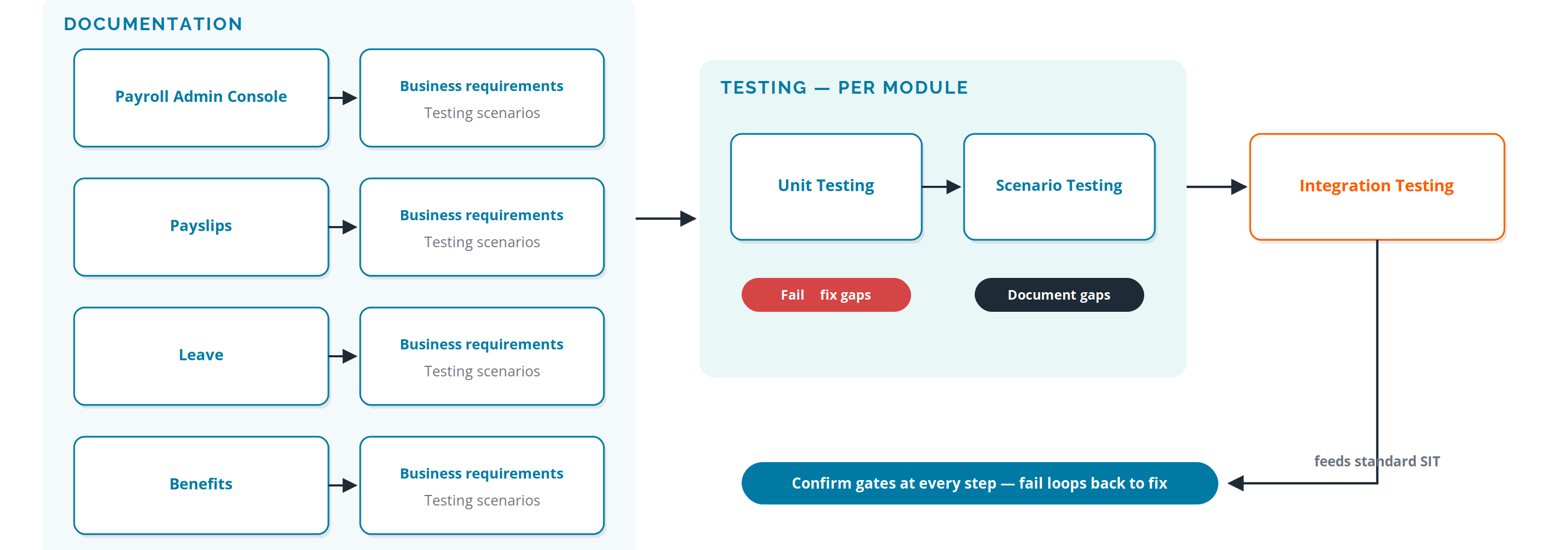
Figure 3 Standard product testing: per-module business requirements, unit and scenario testing, feeding integration testing.
System integration testing (SIT)
Client integrations pass an eight-step SIT flow. Standard scenarios cover the events that break payrolls in the real world — starter, organizational change, termination, salary change, absence — and client-specific scenarios cover the client's own edge cases. Every failure triggers root cause analysis and a retest loop; only a full pass reaches sign-off, parallel run, and migration to production.
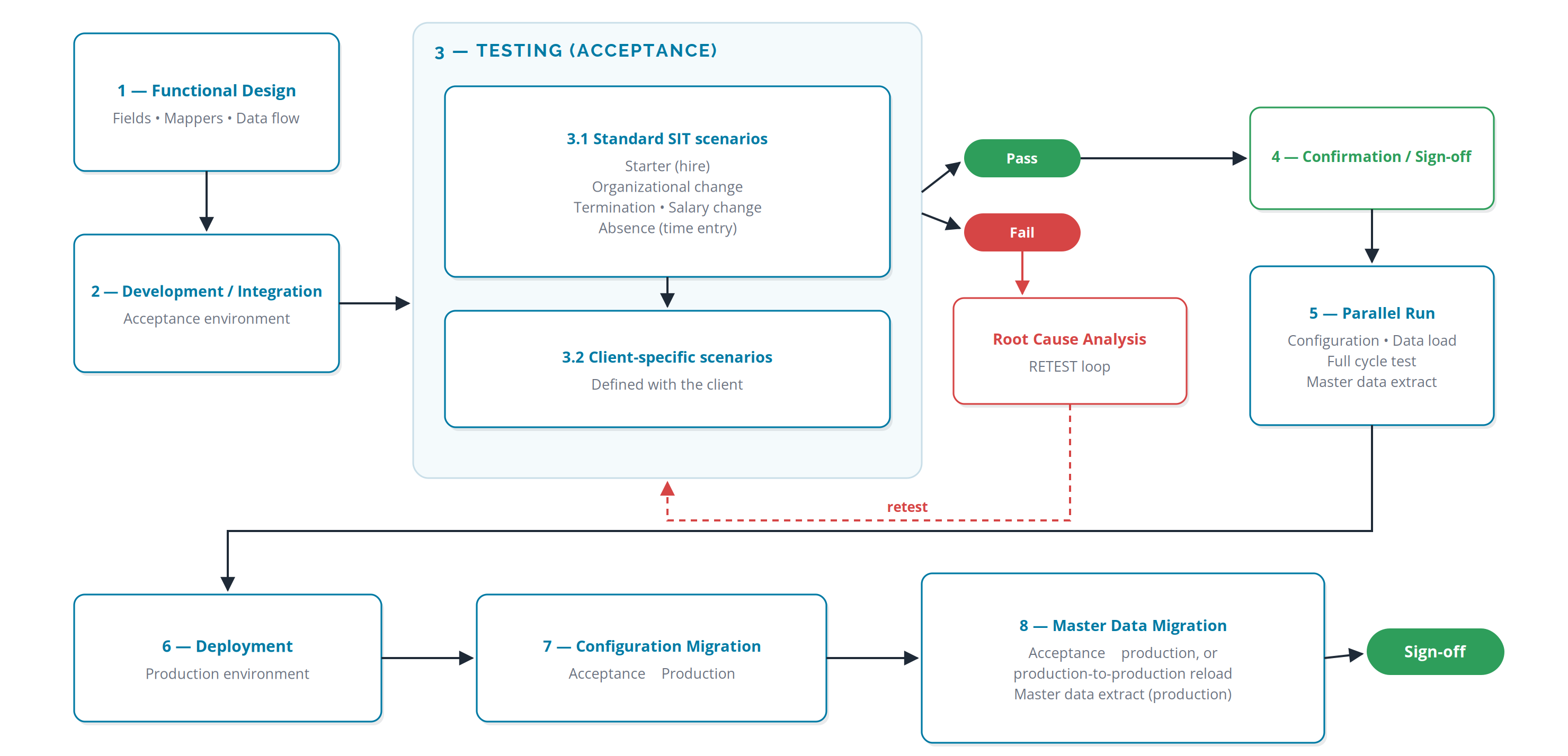
Figure 4 Standard system integration testing with pass/fail RCA loop, parallel run, and migration to production.
Bank File Delivery Operations
Salary funding files are generated, signed, encrypted, and delivered under a key-exchange model agreed with each bank. Two delivery modes operate, depending on the bank's capability: direct delivery over Bank SFTP / host-to-host, and client manual upload of an encrypted file.
Mode 1 — Direct delivery (SFTP / host-to-host)
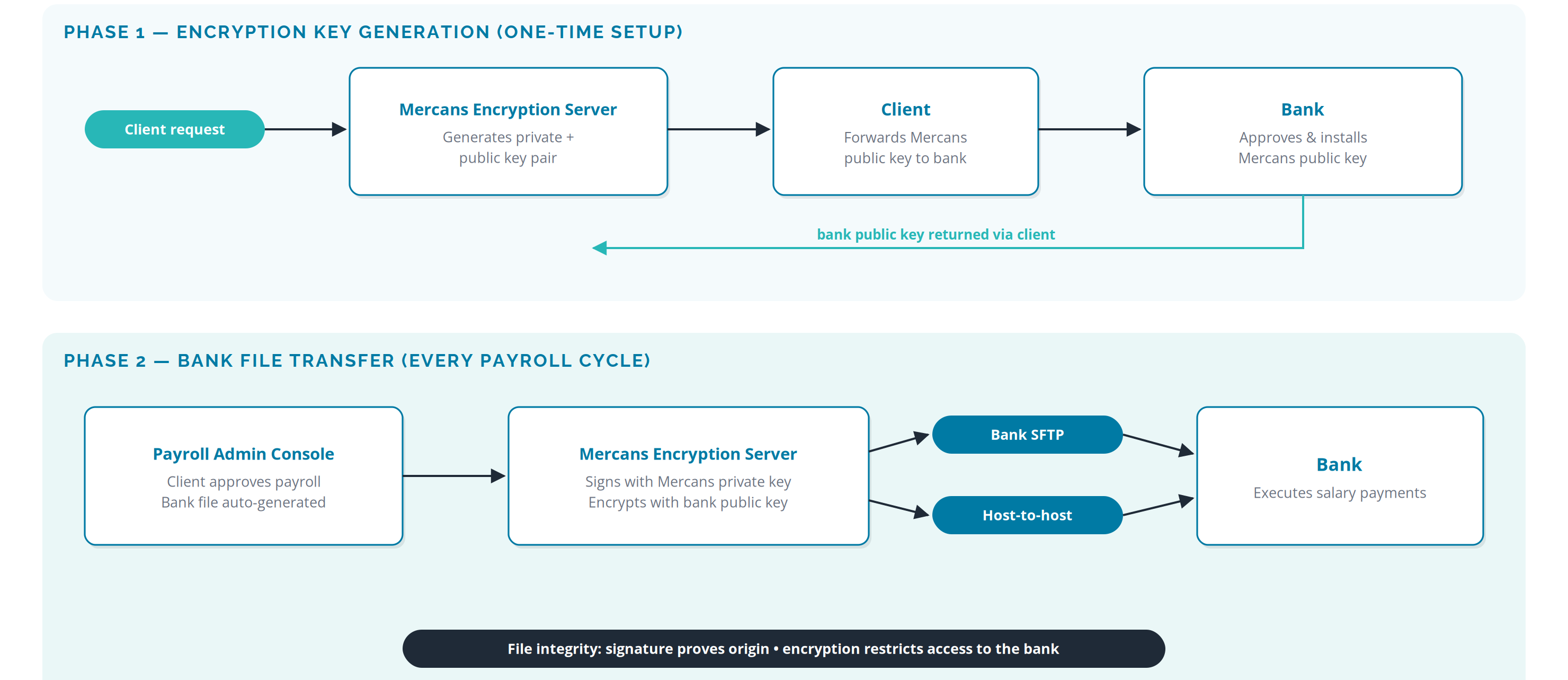
Figure 5 Standard bank file delivery: one-time key exchange, then signed and encrypted per-cycle transfer.
- Phase 1 — key generation (one-time): on client request, the Mercans encryption server generates a private/public key pair; the client passes the Mercans public key to the bank; the bank approves and installs it; the bank's public key returns to Mercans via the client.
- Phase 2 — file transfer (every cycle): the client approves payroll in the Payroll Admin Console; the bank file is generated automatically; the Mercans encryption server signs it with the Mercans private key and encrypts it with the bank's public key; delivery runs over Bank SFTP or host-to-host; the bank executes salary payments.
- Why it is safe: the signature proves the file originated from Mercans; the encryption guarantees only the bank can read it. Neither property depends on the transport channel.
Mode 2 — Client manual upload
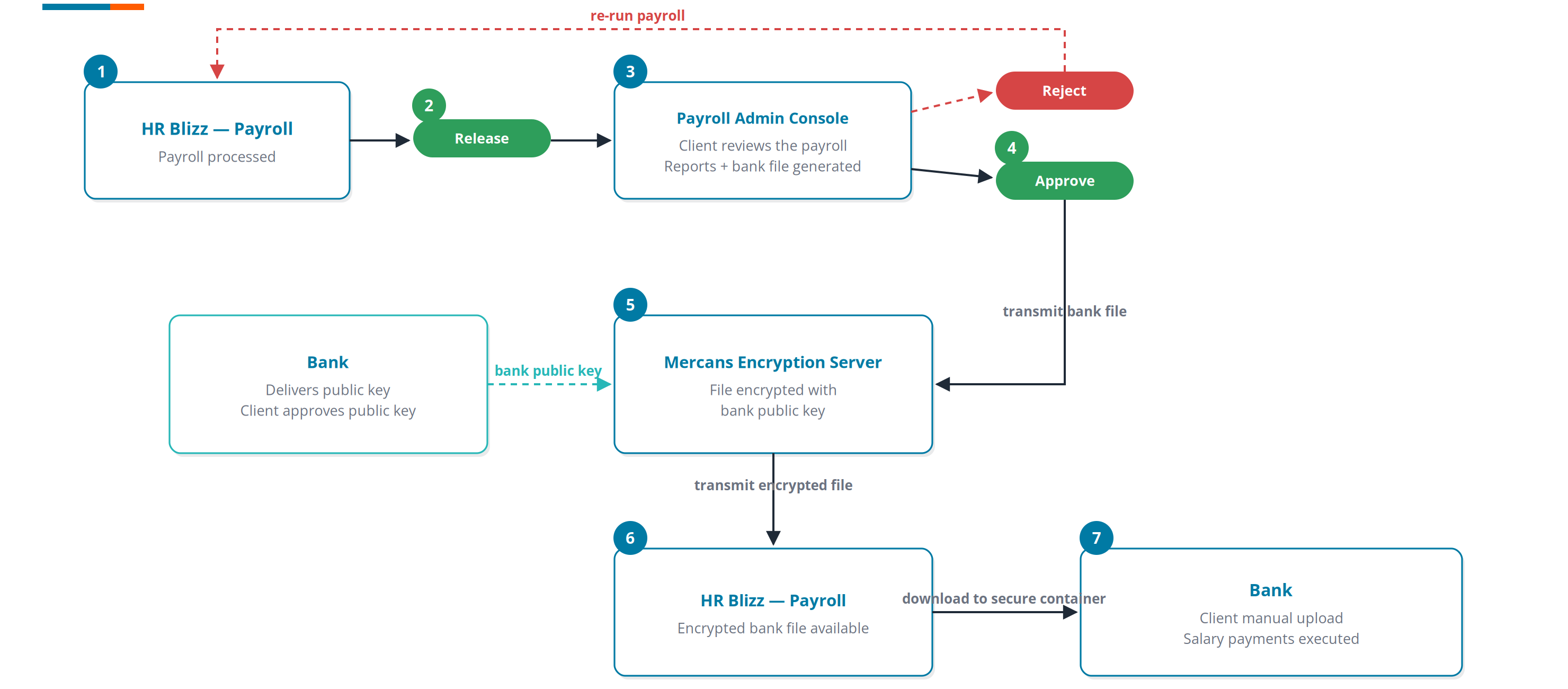
Figure 6 Manual upload variant: client review and approval, encryption with the bank's public key, secure download, manual upload to the bank.
Where the bank requires upload through its own portal: payroll is processed and released in HR Blizz; the client reviews in the Payroll Admin Console and approves (or rejects back into a correction run); the bank file is encrypted with the bank's public key — delivered by the bank and approved by the client — on the Mercans encryption server; the client downloads the encrypted file to a secure container and uploads it manually to the bank, which executes the salary payments.
Operational Security Practices
Platform security is matched by operational discipline in every Mercans delivery location. These controls apply to the people and workplaces that operate the service.
| Domain | Enforced practice |
|---|---|
| Workplace access | All office access is logged; entry by biometric access or personalized PIN codes and keycards; restricted internet access on office networks. |
| Data handling | Confidential information moves only via secure exchange portals; no client data is stored on local devices — server storage only, accessed when needed; no data or devices leave the place of work. |
| Workstations | Centrally managed, password-protected, with limited user access rights; remote encryption and boot-locking software; active virus protection on every workstation. |
| Clean desk | All documents are kept in locked drawers when not in use. |
| Backups | Daily backups of all workstations and storage devices, encrypted and password-protected; delta snapshots twice daily; 31-day onsite retention with one-year external archival. |
| Account controls | SAML 2.0 single sign-on through the client's identity provider (Azure AD, Okta, Auth0 and all common IdPs); OAuth 2.0, OIDC, LDAP, and ADFS supported; multi-factor authentication; TLS v1.2+ enforced on all sessions; 1-hour password-creation tokens; minimum 8-character passwords. |
Exception Handling & Quality Controls
Quality in the HR Blizz operating model is enforced by gates, not goodwill. Three control families run on every payroll cycle:
Every inbound event — file, API call, manual input — passes the validation layer. Format and completeness failures are rejected at field level and itemized in an exception report naming the employee, the event, and the error message, returned to the client for correction.
Recap and exception reports at master-data intake and period opening; inputs report and audit trails at review; standard payroll reports at processing; EFT/WPS, GL, and final payslip summary at approval and publication; a full-period audit trail at close.
Before standard payroll reports reach the client, Mercans audits them internally. A rejected payroll re-opens for processing and re-runs — the client never has to accept an unaudited calculation.
Operating Principle
The client controls every gate; Mercans validates every input; the system records every action. That is the whole operating model.